Playwrite BE WAL Font
Designed by TypeTogether, Veronika Burian, José Scaglione
On Google Fonts since 2024 • Popularity #1675
Quick Summary
4
Styles
100-400
Weight Range
1
Variable axis
1
Languages / Subsets
© 2023 The Playwrite Project Authors
Font Preview
Identify Fonts Similar to Playwrite BE WAL From Any Image
Playwrite BE WAL is a popular handwriting font, designed by TypeTogether, Veronika Burian, José Scaglione. If you've spotted something similar in a logo or screenshot, upload it to find a downloadable Google Font match.
Identify Font From ImageAbout Playwrite BE WAL Fonts
The Dutch-French language divide in Belgium, a phenomenon with roots stretching back to the Middle Ages, continues to be relevant in the country today. Traditions of handwriting education exemplify this circumstance and reflect the country's historical ties to France and the Netherlands. Regardless of the handwriting model adopted, students learn print-style script letters in kindergarten and progress to connected letters in primary school. In Flanders, there is a preference for sloped continuous cursive writing, reminiscent of Dutch handwriting models, whereas the French-speaking community in the Walloon region opts for upright cursive writing, a style that enjoys popularity in France. This diversity in handwriting education is a direct response to Belgium's rich linguistic culture, leading to the introduction of a second official language early in the school years.
Playwrite Belgique Wallonie-Bruxelles is a variable font with a weight range from Thin (100) to Regular (400), and supports over 150 Latin-based languages. It has a single-weight sibling with Guides, Playwrite BE WAL Guides, designed to harmonize seamlessly with this main font while providing a visual aid for primary school children.
To contribute, see github.com/TypeTogether/Playwrite.
Playwrite Belgique Wallonie-Bruxelles characteristics
This upright cursive style features very long extenders and is executed at a slow speed. The capitals are decorative, with features like crossbars in 'T' and 'Z', and a vertical spine in 'S'. The lowercase letters adhere to a continuous, fully connected cursive style, incorporating loops, knots, and curved entry strokes. Notable details include a flat-topped 'z' with a knot and a 't' with a single-sided crossbar, enhancing the ornate nature of this script.
Family name in font menus
Playwrite Belgique Wallonie-Bruxelles appears in font menus with a two-letter country code
‘BE’ and a the ‘WAL’ abbreviation Playwrite BE WAL. It features four
styles: Thin, ExtraLight, Light, and Regular.
The download .zip file includes the variable font and standard static ttf fonts
for each style.
Playwrite fonts for schools
The Playwrite school fonts are based on the findings of Primarium, a groundbreaking educational effort that documents the history and current practice of handwriting models taught to primary school students worldwide. This typographic engine serves teachers, educators, and parents by generating localized libre fonts. These Playwrite fonts are complemented by Playpen Sans, an informal and fun typeface designed for annotations, instructions, and student notes – that also includes emojis.
For more information about the Primarium project, visit primarium.info and to learn more about handwriting education in australia, see primarium.info/countries/belgium.
How to install the fonts?
Windows: Download the font file to your computer. Navigate to where you saved the font file and double-click it to open. Click the "Install" button at the top of the font preview window. The font is now installed and ready to be used across your apps.
macOS: After downloading the font file to your Mac, right-click it in Finder and select "Open With" > "Font Book". Then, click "Install Font" in the font preview window that pops up. The font is now installed and ready to be used across your apps.
How to use the fonts in apps?
The Playwrite font family uses complex OpenType features to generate connected writing. Some common applications require these features to be manually activated.
Note: This font family doesn't include Bold or Italic styles, so please avoid applying them in text editors. If you use the common 'B' and 'I' buttons, you will automatically generate low-quality styles.
Google Docs and Slides: From the font selector drop-down, go to "More Fonts" and search for the desired font name, in this case, "Playwrite BE WAL", and click OK. If some text is already selected, the font choice will apply.
Microsoft Word: Go to Format in the Menu bar, select Font, and then the Advanced tab. Activate "Contextual Alternates" and "Kerning for fonts below" to apply these settings to all text sizes.
LibreOffice: In macOS, to select the different styles, go to Format in the Menu bar, select Character, and use the Typeface menu.
Adobe InDesign: Open the Paragraph Panel and select Adobe "World-Ready Paragraph Composer" from the contextual menu.
Adobe Illustrator: Navigate to Preferences > Type, check the "Show Indic Options" box, and close preferences. Then open the Paragraph Panel and select "Middle Eastern Composer" from the contextual menu.
Adobe Photoshop: Access the Paragraph Panel, then choose "World-Ready Layout" from the contextual menu.
The above instructions are also available in PDF format here.
Who Designed Playwrite BE WAL?
View all designers
TypeTogether is an independent type foundry committed to excellence in type design with a focus on editorial use. Known for the popular typefaces Adelle and Bree, TypeTogether also creates custom type designs for corporate use, including their work for Google Play Books, Clarín, and Apple.
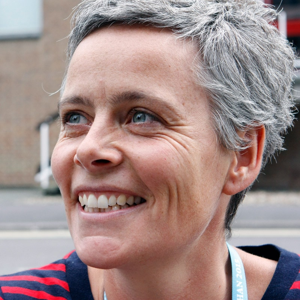
Veronika is a co-founder of the international indie foundry TypeTogether. She is one of the organisers of the alphabettes.org mentorship program, chairwoman of the GRANSHAN project, and organiser of TypeTech MeetUp.

José is a typeface designer, lecturer, and author specialising in typography. He co-founded the TypeTogether font foundry with Veronika Burian, where they have published numerous award-winning type families.
Similar handwriting Fonts
Dancing Script

Impallari Type
Pacifico

Vernon Adams, Jacques Le Bailly, Botjo Nikoltchev, Ani Petrova
Caveat
Impallari Type
Indie Flower

Kimberly Geswein
Shadows Into Light
Kimberly Geswein
Great Vibes

Robert Leuschke